الخميس، 9 فبراير 2012

Windows XP Firewall


To verify that Windows Firewall is enabled


  1. Click Start, and then click Control Panel.


  2. In Control Panel, click Security Center.


    • If Windows Firewall shows On, you are protected.


    • If Windows Firewall shows OFF, it has been disabled.


Fore more information about Windows Firewall and how to use it visit the Microsoft Windows Firewall.

Connecting Wireless

Most computers have wireless networking built-in. If your computer doesn't have a wireless network adapter, you can install one. The type of adapter you install depends on your computer and your level of expertise.

To find out if you have a wireless network adapter or how to install a wireless network in your home please visit the Microsoft Wireless Center.

Computer wont start


How to fix a computer that won't start


A computer that won't boot is frustrating, but the problem is generally easy to fix. The steps you take to troubleshoot the issue depend on your symptoms. Click the account that best describes your issue to find a possible solution:


Disconnect unused network drives


To disconnect unused network drives


  1. Click Start, and then click My Computer.


  2. On the Tools menu, click Disconnect Network Drive.


  3. Select the network drives that you no longer need, and then click OK.


Defragment your computer


To defragment your computer


  1. Click Start, and then click My Computer.


  2. Right-click Local Disk, and then click Properties.


  3. Click the Tools tab, and then click Defragment Now.


  4. The Disk Defragmenter dialog box appears. Click your hard disk drive, and then click Defragment.


  5. Disk Defragmenter will work for at least several minutes, although it might take several hours. When prompted, click Close.


    Tip - If you have more than one hard disk drive, repeat this process for each hard disk drive listed, starting at step 4.


Disk Clean Up


To run the Disk Cleanup tool


  1. Click Start, and then click My Computer.


  2. Right-click Local Disk, and then click Properties.


  3. On the General tab, click the Disk Cleanup button. Disk Cleanup will spend a few minutes examining your disk.


  4. The Disk Cleanup dialog box will appear. Select each of the check boxes in theFiles to delete list, and then click OK.


  5. When prompted, click Yes. Disk Cleanup will spend several minutes removing these files, which will provide you with more space.


    Tip - If you have more than one hard disk drive, repeat this process for each hard disk drive listed in My Computer.


Windows XP


Microsoft Windows XP


Windows XP is an operating system produced by Microsoft for use on personal computers, including home and business desktops, laptops and media centers. First released to computer manufacturers on August 24, 2001, it is the second most popular version of Windows, based on installed user base. The name "XP" is short for "eXPerience."


Windows XP, the successor to Windows 2000 and Windows Me, was the first consumer-oriented operating system produced by Microsoft to be built on the Windows NT kernel. Windows XP was released worldwide for retail sale on October 25, 2001, and over 400 million copies were in use in January 2006. It was succeeded by Windows Vista in January 2007. Direct OEM and retail sales of Windows XP ceased on June 30, 2008. Microsoft continued to sell Windows XP through their System Builders (smaller OEMs who sell assembled computers) program until January 31, 2009.


The NT-based versions of Windows, which are programmed in C, C++, and assembly, are known for their improved stability and efficiency over the 9x versions of Microsoft Windows. Windows XP presented a significantly redesigned graphical user interface, a change Microsoft promoted as more user-friendly than previous versions of Windows. A new software management facility called Side-by-Side Assembly was introduced to ameliorate the "DLL hell" that plagues 9x versions of Windows. It is also the first version of Windows to use product activation to combat illegal copying.


During development, the project was codenamed "Whistler", after Whistler, British Columbia, as many Microsoft employees skied at the Whistler-Blackcomb ski resort.


According to web analytics data generated by W3Schools, from September 2003 to July 2011, Windows XP was the most widely used operating system for accessing the internet. As of January 2012, Windows XP market share is at 32.6% after having peaked at 76.1% in January 2007.


Microsoft Windows XP
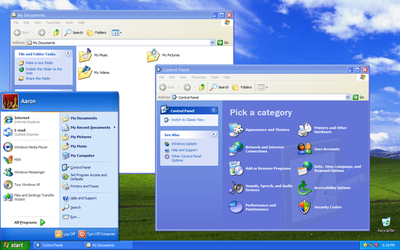
Screenshot of Windows XP


Windows XP
Part of the Microsoft Windows family
Developer
Microsoft Corporation
WebsiteWindows XP: Homepage
Releases
Release dateRTM: August 24, 2001

Retail: October 25, 2001; 10 years ago [info]
Current version5.1 (Build 2600: Service Pack 3) (April 21, 2008; 3 years ago) [info]
Source modelClosed source, Shared source[1]
LicenseProprietary commercial software
Kernel typeHybrid
Update methodWindows Update

Windows Server Update Services(WSUS)

System Center Configuration Manager(SCCM)
Platform supportIA-32, x86-64 and Itanium
Preceded byWindows Me and Windows 2000
Succeeded byWindows Vista
Support status
Mainstream supportEnded on April 14, 2009[2]
Extended supportExtended Support until April 8, 2014 for Windows XP with Service Pack 3 and Windows XP x64 Edition with Service Pack 2[2]
Downgrade supportAvailable until January 14, 2020[3]
Further reading


[ Source: Wikipedia | Copyright info: Used with permission from Microsoft. ]